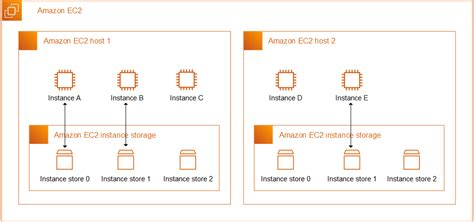
Amazon EC2 instances offer various storage options, and understanding them is crucial for optimizing performance and cost. One such option is ephemeral storage, also known as instance store volumes. But what exactly is stored on an EC2 instance’s ephemeral storage? This comprehensive guide delves into the specifics of ephemeral storage, covering its use cases, limitations, and best practices. We’ll explore the types of data commonly stored in this temporary storage and how it impacts your EC2 instance’s functionality.
Understanding Ephemeral Storage
Ephemeral storage is directly attached to the physical host server of your EC2 instance. This provides high-performance, low-latency access, making it ideal for temporary data. However, it’s important to remember that this storage is ephemeral – it’s lost when the instance is stopped, terminated, or fails. Therefore, it’s not suitable for persistent data storage.
Think of it like the RAM of your computer. It’s fast and readily available, but its contents disappear when you shut down the machine. This characteristic makes ephemeral storage perfect for specific workloads and temporary files but unsuitable for critical data requiring long-term persistence.
Different EC2 instance types offer varying amounts of ephemeral storage. Always check the instance specifications to understand the available storage capacity before deploying your applications.
What Data Should Be Stored in Ephemeral Storage?
Ephemeral storage is best suited for temporary data that doesn’t require persistence across instance restarts. This includes:
- Temporary files and caches
- Data for in-memory databases or distributed caches
- Buffers and scratch space for applications
For example, imagine running a web server. You could store the frequently accessed static assets, like images and CSS files, on the ephemeral storage for faster loading times. Similarly, applications that process large datasets can leverage ephemeral storage for temporary working files, significantly boosting performance.
Storing temporary operational data like logs or application state information on ephemeral storage is also common. However, it’s crucial to implement mechanisms to redirect or capture this information elsewhere if persistence is needed.
Data to Avoid Storing in Ephemeral Storage
Crucially, avoid storing irreplaceable data in ephemeral storage. This includes:
- Databases
- Application code that isn’t backed up elsewhere
- User-uploaded content
- Configuration files requiring persistence
Losing this data due to an instance failure could severely disrupt your operations. For persistent data, Amazon EBS, Amazon S3, or other durable storage solutions are recommended. These services provide data redundancy and persistence, ensuring data integrity even in the event of instance failures. Remember, ephemeral storage’s temporary nature makes it unsuitable for critical data.
Misusing ephemeral storage can lead to data loss and operational headaches. Always assess your data persistence needs before deciding where to store it.
Best Practices for Utilizing Ephemeral Storage
To maximize the benefits of ephemeral storage, consider the following best practices:
- Back up critical data stored on ephemeral storage to a persistent storage solution.
- Monitor disk space usage to prevent application issues due to full ephemeral storage.
- Consider using instance store-backed AMIs for faster instance launches and deployments, though this still has ephemeral data limitations.
Regularly backing up any important data from ephemeral storage is paramount. This could involve scripting a process to copy data to EBS or S3 periodically. Monitoring disk space prevents performance degradation and potential application crashes. Tools like CloudWatch can alert you when disk space reaches critical thresholds.
Leveraging instance store-backed AMIs, while offering faster boot times, requires a clear understanding of the ephemeral nature of the root volume. This approach can be highly effective for deploying stateless applications.
For scenarios requiring persistent block storage, Amazon Elastic Block Store (EBS) offers a reliable and durable solution. It seamlessly integrates with EC2 and provides various volume types to meet different performance and cost requirements.
[Infographic placeholder: Illustrating different data storage options on EC2 and their use cases.]
Frequently Asked Questions
Q: What happens to ephemeral storage when an instance is stopped?
A: All data on the ephemeral storage is lost when the instance is stopped, terminated, or encounters a hardware failure.
Q: Can I increase the size of the ephemeral storage on an existing instance?
A: No, the size of the ephemeral storage is fixed and determined by the chosen instance type. You would need to launch a new instance with a larger instance store volume if you require more ephemeral storage.
Choosing the right storage solution for your EC2 instances is vital for both performance and cost efficiency. While ephemeral storage offers speed and cost-effectiveness for temporary data, understanding its limitations is key. By aligning your data storage strategy with the characteristics of ephemeral storage and adhering to best practices, you can optimize your EC2 deployments and avoid potential data loss. Explore the various EC2 instance types and their storage options here to find the perfect fit for your needs. For more information on EC2 storage options, consult the official AWS documentation (link) and this helpful guide on choosing the right EBS volume type (link). Also, see this informative article about instance store volumes (link). Learn more about optimizing your cloud infrastructure by visiting our blog for regular updates and insights on cloud best practices and cost optimization strategies.
Question & Answer :
I am trying to stop a Amazon EC2 instance and get the warning message
Warning: Please note that any data on the ephemeral storage of your instance will be lost when it is stopped.
My Question
What data is stored in ephemeral storage of an Amazon EC2 instance?
Basically, root volume (your entire virtual system disk) is ephemeral, but only if you choose to create AMI backed by Amazon EC2 instance store.
If you choose to create AMI backed by EBS then your root volume is backed by EBS and everything you have on your root volume will be saved between reboots.
If you are not sure what type of volume you have, look under EC2->Elastic Block Store->Volumes in your AWS console and if your AMI root volume is listed there then you are safe. Also, if you go to EC2->Instances and then look under column “Root device type” of your instance and if it says “ebs”, then you don’t have to worry about data on your root device.
More details here: http://docs.aws.amazon.com/AWSEC2/latest/UserGuide/RootDeviceStorage.html
