Navigating database schema changes is a common task for developers, and SQLite, with its lightweight and serverless design, presents unique considerations. While powerful for many applications, SQLite’s ALTER TABLE command has specific limitations, particularly when it comes to adding multiple columns simultaneously. Many developers often find themselves searching for the most efficient way to modify existing tables, only to realize that a direct sqlite alter table add MULTIPLE columns in a single statement is not natively supported. This article dives deep into understanding why this limitation exists and, more importantly, provides robust, battle-tested workarounds to efficiently evolve your database schema without compromising data integrity. We will explore a multi-step approach that ensures your data remains safe and accessible, even when facing complex schema modifications.
Understanding SQLite’s ALTER TABLE ADD COLUMN Limitations
SQLite is celebrated for its simplicity and efficiency, making it a popular choice for embedded databases, mobile applications, and small-scale projects. However, its design philosophy prioritizes a compact codebase and minimal overhead, which sometimes means certain advanced SQL features found in larger relational database management systems (RDBMS) are either simplified or absent. One such simplification is the ALTER TABLE command’s capability for adding columns.
Unlike databases like PostgreSQL or MySQL, which allow you to specify multiple ADD COLUMN clauses within a single ALTER TABLE statement, SQLite restricts this operation to one column at a time. The standard syntax for adding a column in SQLite is straightforward: ALTER TABLE table_name ADD COLUMN column_definition;. If you attempt to add more than one column using this syntax in a single statement, SQLite will return a syntax error. This limitation stems from SQLite’s internal architecture, which is optimized for minimal resource usage and simpler schema evolution, often preferring destructive operations (like dropping and recreating) over complex in-place modifications for certain schema changes. This design choice, while sometimes inconvenient, contributes to SQLite’s speed and small footprint, as highlighted by its official documentation.
This design decision necessitates a more creative approach when a project requires adding several new fields to an existing table. Developers must understand that a direct, one-line solution for adding multiple columns simultaneously does not exist within standard SQLite SQL. Instead, a methodical, multi-step process involving temporary tables and data migration becomes the standard, ensuring data integrity and consistency throughout the schema update process. This process is crucial for maintaining the stability of your application’s data layer.
The Robust Workaround: A Step-by-Step Approach for Multiple Columns
Since a direct sqlite alter table add MULTIPLE columns in a single statement is not possible, the accepted and most reliable method involves a sequence of operations that effectively rebuild the table with the new schema, migrating existing data in the process. This approach, while requiring more steps, guarantees that your data is preserved and the new columns are integrated correctly. This is often referred to as the “dump and reload” or “rename and recreate” pattern in database migration contexts.
This method is particularly useful when you need to introduce several new fields, perhaps with different data types or default values, to an existing table that contains valuable data. It ensures transactional integrity if executed within a single transaction, meaning either all steps succeed, or none do, preventing partial updates that could corrupt your database. For developers managing schema updates, mastering this pattern is fundamental to reliable database management with SQLite.
Here’s the step-by-step process:
- Start a Transaction: Wrap all operations in a transaction (
BEGIN TRANSACTION;) to ensure atomicity. If any step fails, you canROLLBACK;to the original state. - Rename the Original Table: Rename your existing table to a temporary name (e.g.,
ALTER TABLE original_table RENAME TO temp_table;). This preserves the original data while allowing you to create a new table with the desired schema. - Create the New Table: Create a new table with the original name, including all existing columns and the new columns you wish to add, along with their definitions (data type, constraints, default values).
- Copy Data from Temporary to New Table: Insert data from the
temp_tableinto theoriginal_table. Be explicit about column names to map old data to old columns and provideNULLor default values for the new columns (e.g.,INSERT INTO original_table (col1, col2, new_col1, new_col2) SELECT col1, col2, NULL, 'default_value' FROM temp_table;). - Drop the Temporary Table: Once data is successfully migrated and verified, drop the temporary table (
DROP TABLE temp_table;). - Commit the Transaction: If all steps are successful, commit the transaction (
COMMIT;) to make the changes permanent.
Implementing the workaround for adding multiple columns to a SQLite table requires careful execution. Let’s walk through a concrete example. Suppose you have a table named Users with columns id, name, and email, and you need to add phone_number (TEXT) and last_login_at (INTEGER) columns.
For efficiently adding multiple columns to a SQLite table, the primary method involves a sequence of structured SQL commands to ensure data integrity. This process, often called the “rename-and-recreate” strategy, is the recommended way to perform complex schema modifications in SQLite without losing existing data. It is critical to execute these steps within a transaction to maintain atomicity; if any part of the process fails, the entire set of changes can be rolled back, preventing a corrupted database state.
Here’s the SQL script:
BEGIN TRANSACTION; ALTER TABLE Users RENAME TO Users_old; CREATE TABLE Users ( id INTEGER PRIMARY KEY AUTOINCREMENT, name TEXT NOT NULL, email TEXT UNIQUE NOT NULL, phone_number TEXT, last_login_at INTEGER DEFAULT (strftime('%s', 'now')) ); INSERT INTO Users (id, name, email, phone_number, last_login_at) SELECT id, name, email, NULL AS phone_number, -- New column, set to NULL initially strftime('%s', 'now') AS last_login_at -- New column with a default value FROM Users_old; DROP TABLE Users_old; COMMIT;
When dealing with schema modifications, especially when adding new columns, it’s vital to consider the implications for existing data and application logic. New columns with NOT NULL constraints must have a default value provided during the INSERT step, or the operation will fail. Similarly, foreign key constraints require careful handling; ensure that the new table structure correctly references or is referenced by other tables. Always test your migration scripts on a development database before applying them to production to prevent data loss or Question & Answer :
Is it possible to alter table add MULTIPLE columns in a single statement in sqlite? The following would not work.
alter table test add column mycolumn1 text, add column mycolumn2 text;
No, you have to add them one at a time. See the syntax diagram at the top of SQLite’s ALTER TABLE documentation:
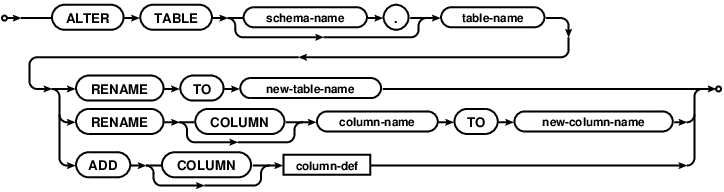
There’s no loop in the ADD branch so no repetition is allowed.
